Animal, person and vehicle detection
A first-pass detector should remove empty or irrelevant files from your attention and surface the events worth reviewing.
2026 buyer's guide
The best trail-camera software is not simply the tool with the most AI labels. It should shorten review time, preserve your original evidence, let you correct uncertain predictions, reveal activity patterns and fit the way you actually use camera folders.
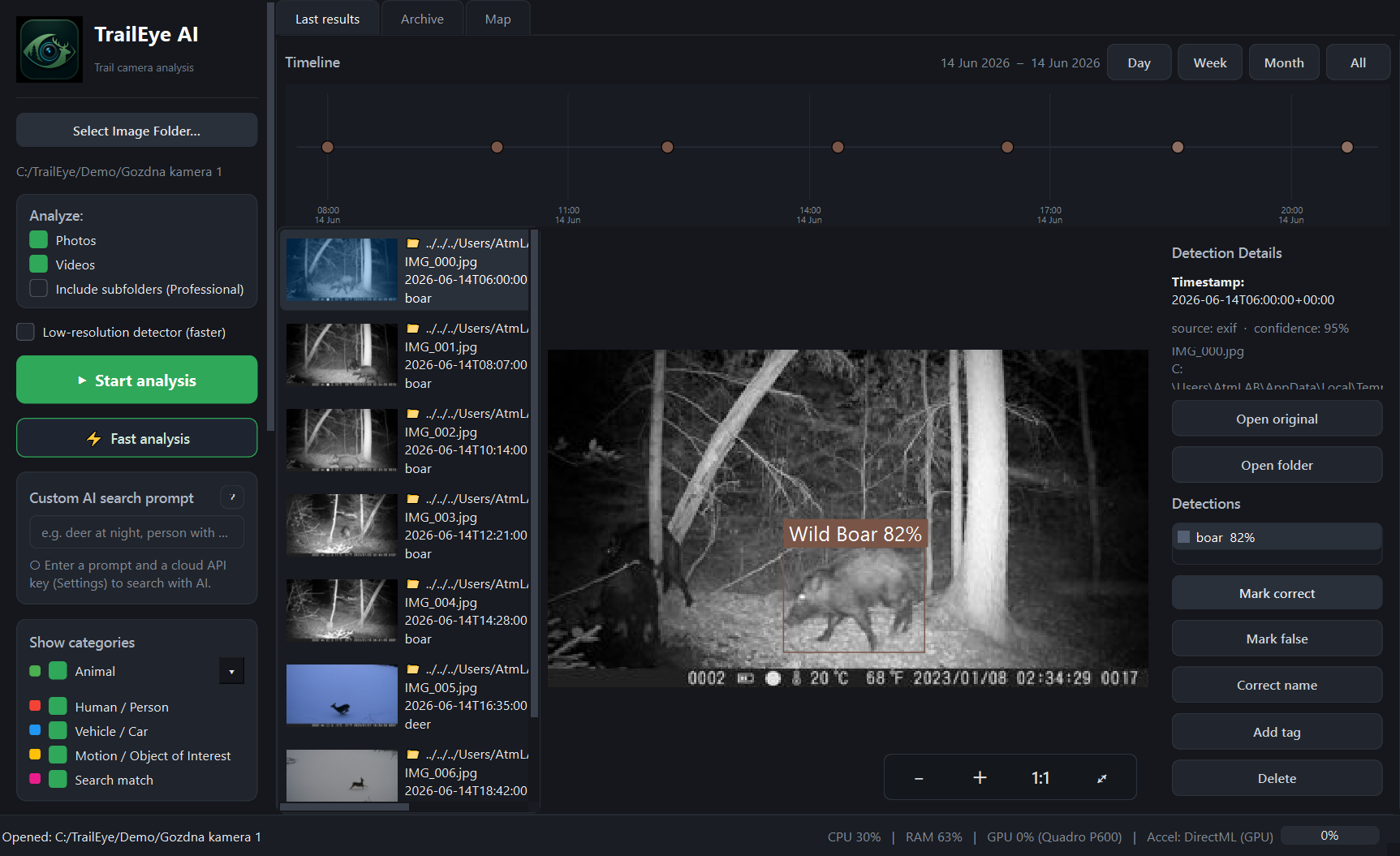
TrailEye combines event detection, species prediction, timestamps, review controls and timeline context in one Windows workflow.
Selection checklist
These are the capabilities that make the biggest difference once a camera archive grows beyond a few dozen files.
A first-pass detector should remove empty or irrelevant files from your attention and surface the events worth reviewing.
Species prediction is useful when it remains reviewable. Look for software that lets you confirm, reject or relabel uncertain results.
For private land, hunting areas and research sites, local analysis can avoid uploading an entire archive just to perform standard detection.
Camera overlays, EXIF metadata and file timestamps all matter. Good software should recover time context rather than treating every file as anonymous.
Sorting is only the first step. The more valuable question is when a selected species, person or vehicle is actually active.
Multi-camera projects become much easier to interpret when detections can be connected to individual camera sites.
Optional natural-language cloud AI can be useful when you need to search for a visual detail that is not part of a predefined species list.
A basic sorter can separate animal images from empty frames, which is useful for small folders. But as the archive grows, the harder problems become organization, validation and interpretation. You need to know which species appeared, when they were active, which camera recorded them and whether the AI result can be trusted.
That is why a complete trail-camera workflow should keep the original image or video attached to every detection and allow a person to correct uncertain classifications. AI should reduce repetitive work, not hide the evidence.
Cloud analysis can be powerful, but uploading every file may be slow, costly or undesirable for private camera locations. A local-first workflow keeps standard detection on the Windows PC and uses internet-connected services only when they add a specific benefit.
TrailEye follows that model: standard animal, person and vehicle detection runs locally, while optional cloud AI can be used for flexible natural-language searches beyond the built-in classes.
Night illumination, partial animals, motion blur, vegetation and unusual camera angles can challenge any wildlife model. A confidence score is helpful, but the ability to confirm, reject or relabel a result is more important for serious use.
TrailEye provides reviewable wildlife species suggestions and keeps those predictions in a human-review workflow rather than treating them as unquestionable ground truth.
Once detections have reliable timestamps, the archive can answer questions that ordinary folder sorting cannot. TrailEye can show hourly and daily activity and filter the analysis to a selected wildlife species, all animals, people or vehicles.
That makes it possible to distinguish, for example, deer activity from human traffic rather than combining every event into one generic graph.
TrailEye is particularly suitable if you want a Windows desktop workflow that combines local detection, species prediction, timestamp recovery, reviewable classifications, activity heatmaps, camera-site maps and exports. It also supports photos and short videos in the same folder-based workflow.
Free: up to 100 photos per analysis, DeepFaune with 38 regional classes, one folder, no video. Explorer: €29 once, up to 3,000 photos per analysis, DeepFaune with 38 regional classes, subfolders and one computer. Photos only. Professional: €89 once, Google SpeciesNet with 2,000+ labels, unlimited photos, video, subfolders and two computers.
Use your own difficult images, not only perfect daylight examples. Test night IR frames, distant animals, partial bodies, vegetation, motion blur and mixed photo/video folders. Check whether false positives are easy to reject and whether exported results remain useful outside the application.
Also compare the workflow itself. A model can be accurate but still waste time if reviewing, correcting and finding past events is cumbersome.
Explore by use case
Permanent Free edition · Local AI recognition · No credit card