Surface animal events
Separate likely animals from person, vehicle and irrelevant events before detailed review.
Review more cameras in less time
TrailEye AI turns folders of trail-camera photos and videos into a reviewable archive with wildlife detections, supported species predictions, timestamps, activity views and camera-site maps—on your Windows PC.
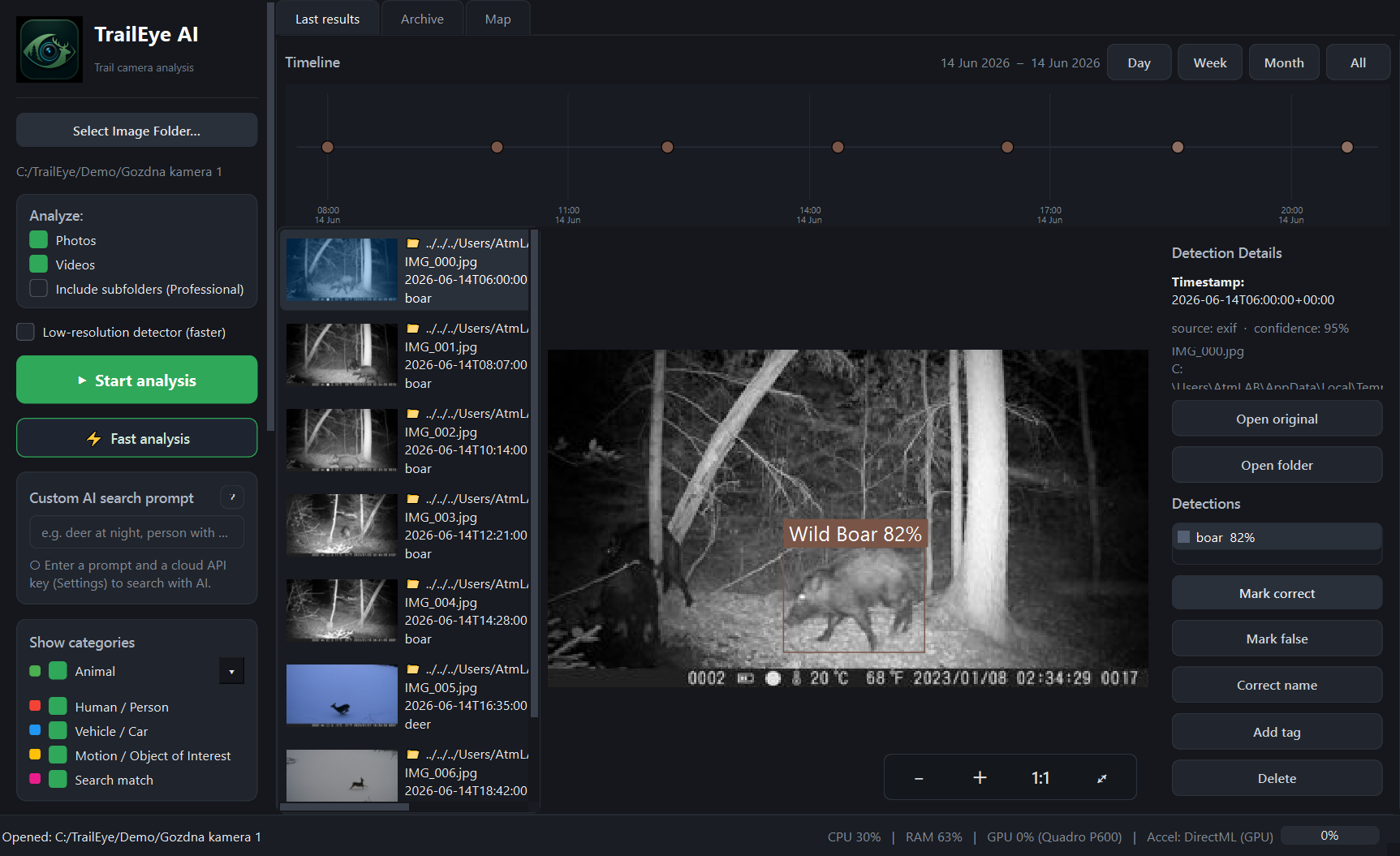
Keep the original image, predicted species, timestamp and event context together while you review.
From card pull to useful pattern
TrailEye handles the repetitive first pass, while you decide which sightings are meaningful for your property, habitat work or hunt planning.
Separate likely animals from person, vehicle and irrelevant events before detailed review.
Use supported species suggestions as a starting point, then confirm or correct the result.
Read burned-in timestamp overlays with OCR and use metadata or file time as fallbacks.
Review observations by hour, day, sun period and available moon context.
Connect detections to manually placed sites or photo GPS where available.
Create data, image and report outputs for landowners, club members or management records.
Seasonal archives often mix still images, burst sequences and short clips. TrailEye analyzes both photos and videos from ordinary folders, so you can review them in one desktop workflow rather than moving between separate tools.
A trail camera records only what passes within its detection zone. Camera placement, sensitivity, vegetation, weather and animal direction all influence the archive. TrailEye can reveal patterns in the footage you collected, but it cannot prove that an animal was absent or predict future movement with certainty.
Use hourly and daily activity, sun-period context and camera-site filters alongside field knowledge, tracks, habitat conditions and applicable hunting regulations.
Camera folders can expose property layouts, people, vehicles and exact wildlife locations. TrailEye’s standard analysis pipeline runs locally on Windows, so those files do not need to be placed in a mandatory cloud gallery. This also suits non-cellular cameras and locations with limited upload connectivity.
Map tiles, licensing and optional cloud search can use a network connection. The optional text-prompt search requires your own provider API key and is separate from local detection.
TrailEye begins with files copied from a camera card, disk or existing archive. It is not tied to one camera manufacturer. File compatibility and timestamp quality can still vary between camera models, so test the permanent Free edition with your own media before choosing a paid licence.
Explorer and Professional are one-time licences, not recurring subscriptions.
Technology should support responsible decision-making, not replace judgment or applicable rules. Follow local laws and hunting regulations governing trail cameras, real-time data and camera placement. Do not use human or vehicle detections for harassment, stalking or unlawful surveillance.
Related TrailEye workflows
Permanent Free edition · Full AI recognition · No credit card