Choose a camera folder
Point TrailEye at a folder containing supported photos, videos or both. Your source files stay where they are.
Photo and video sorting on Windows
TrailEye AI reviews a camera folder locally, surfaces animal, person and vehicle events, refines supported wildlife species and builds a searchable archive. You stay in control of every result.
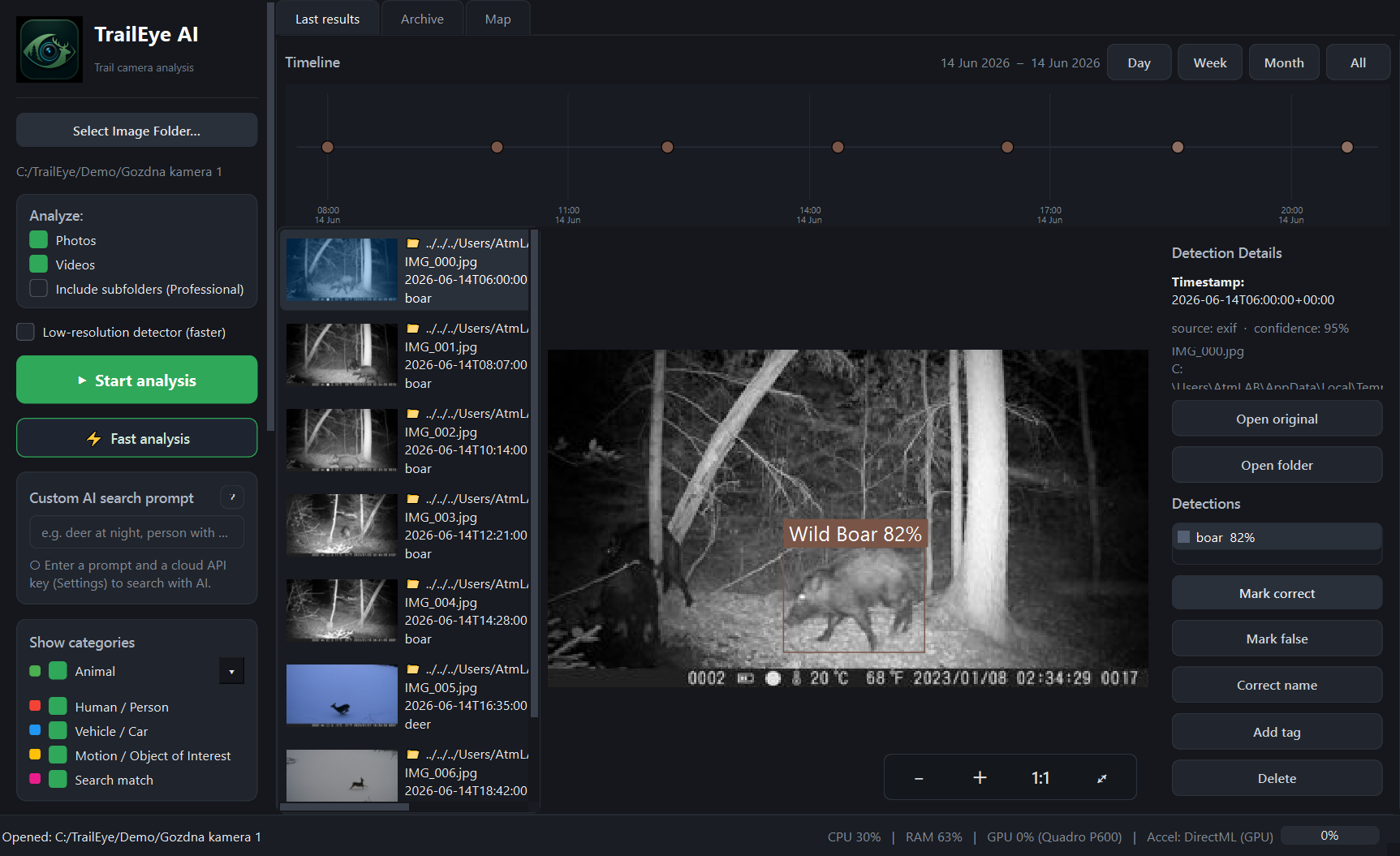
Real TrailEye AI interface: original image, detection details, timeline and review controls in one view.
A shorter path through the SD card
TrailEye is designed for ordinary trail-camera folders. It does not require a particular camera brand or a cloud-camera subscription.
Point TrailEye at a folder containing supported photos, videos or both. Your source files stay where they are.
The local pipeline detects animals, people and vehicles and attempts species refinement for supported wildlife.
Review detections, reject false positives, relabel uncertain results and move through events with keyboard shortcuts.
TrailEye reads burned-in timestamps with OCR and falls back to EXIF or file time when needed.
Filter by species and inspect activity by hour, day, sun period, camera site and other available context.
Export selected data, images and reports instead of leaving useful findings trapped in a camera folder.
A useful sorter should reduce repetitive review without hiding the original evidence. TrailEye keeps the source file connected to each result and lets you correct AI decisions. That matters because night images, partial animals, vegetation, weather and low-resolution captures can challenge any recognition model.
The goal is not to pretend that every prediction is perfect. The goal is to bring likely events forward, preserve context and make human review faster and more consistent.
Many trail-camera archives contain both still images and short clips. TrailEye handles photos and videos through the same folder-based workflow, so you do not need a separate manual process for each media type. Results can be reviewed in the application and connected to the wider archive.
TrailEye’s first detection stage distinguishes animals, people and vehicles. This helps hunters and wildlife watchers focus on animal events, while land managers can also locate relevant human or vehicle activity. TrailEye does not identify individual people and should always be used in accordance with local privacy and camera-placement laws.
Free is permanent and does not require payment details. Explorer and Professional are one-time purchases rather than subscriptions.
Processing speed depends on file size, media type and Windows hardware. Compatible graphics hardware can accelerate local inference through DirectML. AI confidence also varies with distance, lighting, motion blur, camera placement and how much of the animal is visible. Important classifications should be checked by a person.
Related TrailEye workflows
Permanent Free edition · Full AI recognition · No credit card